
Datgel Output Tool

Automated output of reports to print or pdf, and generate cross-sections along an alignment. Saves hours on moderate sized projects, and man weeks on larger projects.
Download DocumentationSaves hours on moderate sized projects, and weeks on larger projects.
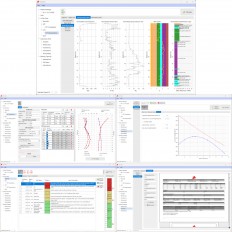
The Datgel Output Tool enables the user to create output configurations of multiple reports in a user friendly interface, save and recall configurations, and print or pdf the reports. It also can generate cross-section fences reports along an alignment.
The Output Tool is only an Add-In program, the reports you see in images are actually part of other Datgel Tools. This tool will work with any gINT library/project structure, as it dynamically reads the tables, fields and reports that are available. There are two interfaces, the Output Tool, and the Fence Output Tool. The latter is used to produce cross sections along an alignment, and the former is used for everything else.
The most common use of this Tool is to pdf or print multiple reports grouped by PointID (Borehole). Say you have 100 boreholes in gINT and you have a non-cored log report, cored log report, and core photo graphic table report (from the Datgel Photo Tool). You need to produce one PDF with BH1 - non-core log, core log, photo; BH2 - non-core log, core log, photo; BHn - non-core log, core log, photo. Using normal gINT you could pdf the 3 reports separately, then reorder 400+ pages manually in a PDF editing program which would take hours and there would be many errors. Or you could produce exactly what you need with a few clicks using the Datgel Output Tool which also creates automatic bookmarks for each PointID and each report.
Key Features
- Configure and output (PDF, Raster, Preview or Print) multiple reports grouped by Key Set (PointID, Sample etc.), by each Report, or by Range Filter (such as geology code/unit)
- Work with single and multiple gINT projects
- Most gINT output options are configurable
- Multiple configurations may be saved and recalled, and may be stored in the Project, Library, User (current user on local PC), or Computer (all users on local PC); Further, configurations may be imported and exported to XML
- Assign User Report Variable values to all reports in a configuration
- Improved Range Filter configuration
- The enhanced PDF Bookmark grid allows you to define dynamic multi-branch hierarchies; The options include Key Set, Report Information and Range Filter information
- Increment figure numbers
- GDW Export allowing for the output of multiple reports to one page
- Drawing Export - GDW, DXF, DGN
- Fence Output Tool
- Full user control of scales, extents, cross section intervals etc.
- Output 1, 2 4 or more fence frames per page, with automatic page numbering
- Save and recall configurations - automatically saved in the project file
| Category | Data Management , Site Characterization & In-situ Testing (General) |
| Licence Type | Commercial |
| Operating Systems | Windows 7, Windows 8, Windows 10, Windows 11 |
| Current Version | 4.0 |
| Developer | Datgel |
| Developer Website | http://www.datgel.com/datgel-output-tool?&utm_source=Web%20Other&utm_campaign=geoengineer |
| Developer Email | [email protected] |
Recommended Software

GEO5 Stratigraphy - Logs


Oasis montaj

Res2DInv and Res3DInv


Syscom Cloud Software (SCS)
Related Software




News on Software
On This Day
August 26th 1833
READ MORE