Adopting GeoStudio for PLAXIS LE users: A Resource Guide Sponsored
As PLAXIS LE reaches the end of its development lifecycle, many users are beginning the transition to GeoStudio, Seequent’s solution for geotechnical analysis. This shift represents more than just a change in software. It marks the beginning of a new chapter with GeoStudio, a platform that will continue to evolve with ongoing innovation, expanded capabilities, and deeper integration across geotechnical workflows.
This document serves as a comprehensive collection of practical resources aimed at supporting end-users through this transition, making the transition to GeoStudio as smooth as possible.
- Common Challenges
- Benefits of using GeoStudio over PLAXIS LE
- Capabilities users might lose when leaving PLAXIS LE
- Important Reminders!
Common Challenges
While GeoStudio offers a powerful and future-ready platform, transitioning from PLAXIS LE can raise concerns for users who are familiar with the legacy tool. Below are the most common challenges users face—and how to overcome them with confidence.
Trust of results: One of the most significant concerns is whether GeoStudio will deliver results as reliable as PLAXIS LE. Building trust in a new tool takes time, but real-world success stories can help bridge that gap.
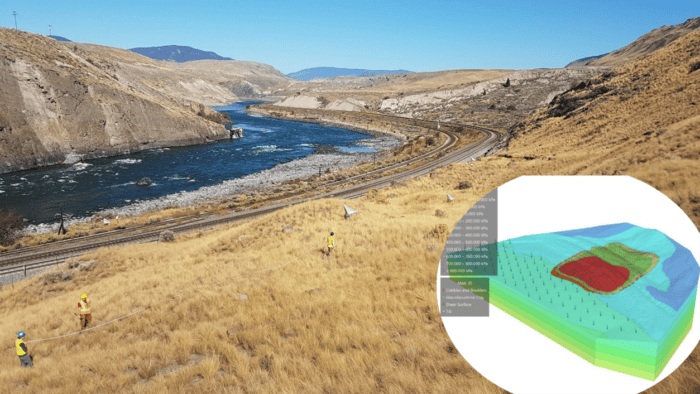
- Case Study: Ripley Landslide: A detailed stability analysis of the Ripley landslide in British Columbia demonstrated GeoStudio’s capabilities in replicating and enhancing traditional PLAXIS LE workflows can be found here: Using GeoStudio to conduct 3D numerical analysis of groundwater seepage and stability at the Ripley Landslide site.
Details on how the models were transferred, and results comparison can be seen in the YouTube video.
GeoStudio’s Proven Track Record
GeoStudio has been used for over 40 years in critical infrastructure projects worldwide. Its credibility is backed by a strong foundation in geotechnical science and continuous innovation.
Highlighted Real Projects:
- OceanaGold’s Waihi Tailings Storage Facility – A mining success story using GeoStudio
- Longest Dam in Southeast Asia – A hybrid project using both PLAXIS and GeoStudio
- India’s First Integrated Renewable Energy Project
- AECOM’s Transient Seepage Analysis
Geometry Model transfer: Transferring models from PLAXIS LE to GeoStudio may seem like a daunting task. These videos provide step-by-step information on the transfer process.
- 3D Model transfer via material volumes meshes and contact surfaces from PLAXIS LE or PLAXIS Designer into GeoStudio 3D
- 2D Cross section transfer from PLAXIS LE to GeoStudio
Access results from PLAXIS LE files: Once a PLAXIS LE license expires, users may lose access to the software. It’s essential to prepare in advance. Recommendation:
Export all relevant outputs and reports from PLAXIS LE before the license ends. This includes:
- Factor of safety results
- Material properties
- Geometry and mesh data
- Graphs and charts
Tips:
- Use the “export to .DXF” available in the 2D output view under the File Menu Bar.
- Explore the comprehensive export options under Reports Menu Bar in the 2D/3D Output.
- If you are a Python expert and require exporting a large userbase, consider automating the task with the PLAXIS LE API.
- Create a backup folder with all exported PDFs, CSVs, and screenshots for future reference.
Learning a new tool: Time investment is a common concern when adopting new software. Fortunately, Bentley and Seequent offer tailored learning paths to ease the transition.
Training Resources for Getting Started with GeoStudio:
- Introductory courses in the Seequent Learning Centre:
- SLOPE/W Fundamentals online course
- Getting Started with SLOPE3D YouTube series
- 3D Model Creation with GeoStudio:
Benefits of using GeoStudio over PLAXIS LE
GeoStudio not only continues the legacy of PLAXIS LE but also expands it with powerful new capabilities, deeper integration, and a clear path for future innovation. Here are some of the key benefits:
Seamless Integration with PLAXIS: GeoStudio is designed to work alongside PLAXIS, enabling users to leverage both tools where appropriate. For example, you can use GeoStudio for limit equilibrium analysis and PLAXIS for finite element modelling—ensuring continuity and flexibility.
Advanced 3D Limit Equilibrium Analysis: GeoStudio 3D introduces powerful tools for 3D slope stability analysis in soil and rock, including reinforced slopes, groundwater coupling and extensive settings for searching and optimization. Examples in practice:
- Structurally Controlled Stability Analysis
- 3D Coupled Groundwater and Stability Analysis
- Getting Started with SLOPE3D - YouTube Series
Interoperability with Leapfrog: GeoStudio integrates seamlessly with Leapfrog for both 2D and 3D workflows, enabling users to bring geological models directly into their geotechnical analyses.
- Cross-sections from Leapfrog to GeoStudio: Importing 2D sections from Central into GeoStudio
- Surface Meshes from Leapfrog to GeoStudio
- Geological Models from Leapfrog to GeoStudio
Continuous Enhancements & Technical Support: GeoStudio is under active development, with regular updates that introduce new features and usability improvements. Users benefit from a strong support network and a growing library of learning content.
- Stay up to date via regular communication and our GeoStudio Release series on YouTube
- Sign up with the Digital Currency - Geotechnical edition
Capabilities users might lose when leaving PLAXIS LE
While GeoStudio offers a modern and continuously evolving platform, it’s important to acknowledge that some specific features or workflows from PLAXIS LE may not have direct equivalents—or may require different approaches—in GeoStudio. Understanding these differences helps users plan their transition more effectively.
Legacy Project Compatibility: Users without a perpetual PLAXIS LE license may lose access to their historical models once the license expires. This can impact on the ability to review past analyses or reuse model setups. Recommendations:
- If you are also a PLAXIS 2D user: Open the model in PLAXIS 2D, export geometry and material data, then import into GeoStudio to preserve essential inputs. This option is available for PLAXIS 2D 2024.3 and earlier versions.
- If you lose access to PLAXIS LE: Follow the recommendations available in this documentation around exporting all relevant data prior to losing access to the software.
PLAXIS Designer Functionalities: PLAXIS Designer offers a streamlined way to build 3D models for PLAXIS LE. While this tool is not part of GeoStudio, the 3D interface contains built-in environment for 2D/3D model creation and volume meshes import. Reasons to adopt the GeoStudio 3D workflow for model creation:
- Dynamic Updates: When you modify a parameter, the entire model updates automatically to reflect the change. This saves time and ensures consistency.
- Section Extrusion made easy: Here, unlike in Designer where it is necessary to separate your section by polylines for recreation, you an extrude the entire section (including internal parts such as drains and details), and the software would automatically convert those to solids. The software allows defining paths like the Road Builder tool in PLAXIS Designer.
- Cutting operations: Intersecting solids in several different ways are facilitated by the cutting operations tools available in GeoStudio 3D.
- Tool-Based Design History: The model retains a history of design actions. Modifications at any stage (e.g., slope changes or detail adjustments) automatically update subsequent stages, eliminating the need to repeat steps like in PLAXIS Designer.
- Feature similarity with PLAXIS: Similar modeling tools in PLAXIS and GeoStudio streamline geometry transfer, minimizing redundant work for 3D FEM and LEM analyses.
- Direct interoperability with Leapfrog: Geological Model volumes built using implicit modeling via Leapfrog can be directly transferred to GeoStudio, providing time efficiency on the geometry creation of 3D slope stability.
Certain Analysis Types or Settings: Some niche analysis types or settings available in PLAXIS LE may not yet be implemented in GeoStudio or may require a different modeling approach. For example:
- SoilVision Soils Database: While GeoStudio supports material libraries, it does not currently replicate the full functionality of the SoilVision database. The SoilVision Soils Database, a valuable tool for managing material properties in PLAXIS LE, is not fully replicated within GeoStudio. Users who have relied on this feature should take proactive steps to preserve their data before transitioning.
- Export options: There are currently two options to export your soil database from SoilVision Soils - One per material and the other for your entire user database. Watch this step-by-step video guide (click here).
- View the database online: Soilvision21DB.db3 is the user soils database available in your model folder. It's not encrypted and is readable with any SQLite reader application. Use this URL to open the file and view the tables within: https://inloop.github.io/sqlite-viewer/
Tip: Once exported, you can manually recreate your material library in GeoStudio using the saved parameters. This ensures continuity in your modeling practices even after leaving PLAXIS LE.
- Pseudo 3D consolidation analysis: This functionality will remain accessible only through the legacy PLAXIS LE license. Users who rely on this method for their geotechnical evaluations should plan accordingly.
- 3D Dynamics Analysis: This functionality will remain accessible only through the legacy PLAXIS LE license, so users who depend on this method for their geotechnical evaluations should plan accordingly. Dynamic calculations are also available in PLAXIS 3D. Users are encouraged to explore alternative modeling approaches, check this to learn more about the advanced capabilities available in PLAXIS.
Important Reminders!
- Don’t forget to update to the Latest PLAXIS LE Version: Check out the PLAXIS Blog for updates on the latest version of PLAXIS LE and PLAXIS Designer. We strongly recommend downloading V21.08. - PLAXIS LE CONNECT Edition V21.08 Release Notes
- Got Questions on the Migration Plan? Don't forget to consult the FAQ for any queries about the support timeline. Your answers are just a click away! PLAXIS LE Product Support & Retirement article.
- Your Commercial Migration Partner: Keep in touch with your Seequent/Bentley Sales representative for seamless assistance during your commercial migration journey
- We've Got Your Back! The PLAXIS & GeoStudio technical team is here to support you through the migration process and help you achieve success in your future projects. Let's make great things happen together!
Want to read more like this story?

PLAXIS 2023.2 New release is out!
Sep, 07, 2023 | NewsThis latest release solidifies Seequent's Connected Geotechnical Workflow, reducing the need for du...

Introducing PLAXIS LE CONNECT Edition V21
Feb, 10, 2021 | NewsWith the introduction of the PLAXIS CONNECT Edition V21, SOILVISION products are adopting the PLAXI...

Bentley Webinar: FE and LE solution for Geotechnical Projects using PLAXIS WorkSuite
May, 11, 2022 | EventPLAXIS 2D/3D WorkSuite is the most comprehensive option of PLAXIS which includes PLAXIS 2D/3D Ultim...

Subsurface Informed Infrastructure Series: Integrated geotechnical analysis with GeoStudio and PLAXIS
Aug, 22, 2025 | EventJoin us for an online workshop where you'll learn how to set up and run slope stability and deforma...

Bentley releases new PLAXIS versions
Jun, 15, 2020 | NewsBentley is happy to announce the release of new PLAXIS CONNECT version (Edition V20 Update 3), incl...

New release PLAXIS CONNECT Edition V22 Update 1 is out!
May, 19, 2022 | NewsIn this latest minor release for PLAXIS 2D, PLAXIS 3D and Monopile Designer Bentley Systems introdu...

PLAXIS CONNECT Edition V20 Update 4
Jan, 11, 2021 | NewsBentley Geotechnical Engineering experts are continuously improving PLAXIS CONNECT Edition. In this...

Seequent Webinar | GeoStudio: The Future of Limit Equilibrium Analysis
Jun, 10, 2024 | EventJoin us for a presentation where we will show you the capabilities of GeoStudio in Limit Equilibriu...

How the Past 30 Years of PLAXIS History Pave the Way for a Promising Future
Oct, 05, 2023 | NewsOver the last 30 years, PLAXIS innovation has driven the geotechnical analysis industry, enabling e...
Form
Looking for more information? Fill in the form and we will contact Seequent, The Bentley Subsurface Company for you.
On This Day
August 11th 1988
READ MORE
Related Video

Trending

Embankment Collapse on NH-66 in Kooriyad Triggers Engineering and Oversight Review
Fehmarnbelt tunnel advances with first element ready for immersion

Geotechnical Engineering 2032 Boom: Trends, Challenges, and Emerging Opportunities

Emergency protocols activated following offshore 7.7 magnitude earthquake in Japan
Tailrace tunnel breakthrough advances Australia’s largest renewable project
A Legacy of Leadership, Mentorship & Service: Gary L. Seider P.E.